
Why Your EPUB Won't Open (and How to Fix Every Common Error)
A systematic troubleshooting guide for EPUBs that crash, display blank pages, show garbled text, or refuse to open in Apple Books, Kindle, Kobo, and other readers.
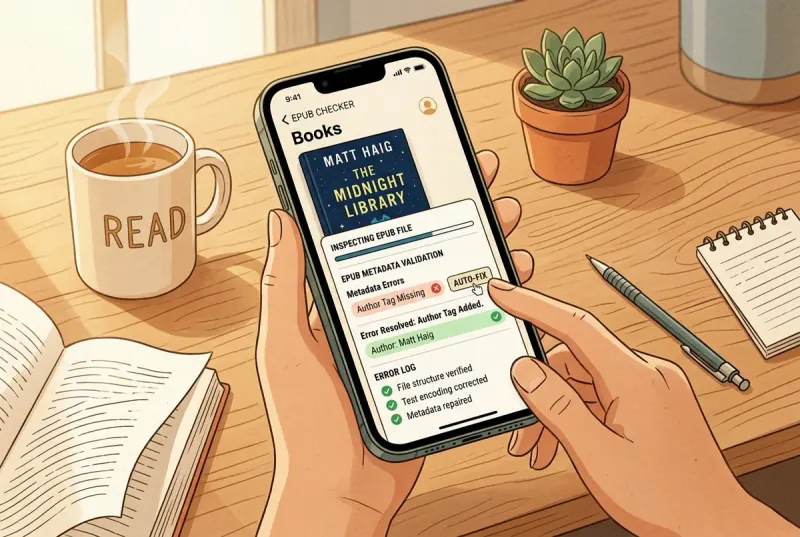
Start here: try opening the EPUB in a different reader app. If it opens there, the problem is app-specific, not file corruption. If it fails everywhere, import the file into EpubTidy—it diagnoses structural issues and repairs most of them in one tap. If even EpubTidy cannot open it, the ZIP archive itself is damaged and you need to re-download the original file. This guide covers all seven categories of EPUB failure—from corrupted downloads and missing metadata to DRM locks and encoding errors—explains what is actually broken inside the file, and walks through the fix for each one.
Essential Facts & Reader Takeaways
- ✓First step: try another reader app. If the EPUB opens in one app but not another, the file is valid—the failing app is just stricter or incompatible.
- ✓Second step: import into EpubTidy. About 80% of EPUB failures are structural (broken manifest, bad encoding, missing references) and EpubTidy auto-repairs them.
- ✓If nothing opens the file: the ZIP archive is physically damaged. Re-download the original, or use a desktop ZIP repair tool to recover the contents.
- ✓DRM-protected EPUBs cannot be opened outside the store app that sold them. This is a license lock, not corruption—no repair tool can bypass it.
- ✓Garbled text (mojibake) is almost always a UTF-8 vs. Windows-1252 encoding mismatch. EpubTidy normalizes encoding automatically.
Category 1: Corrupted or Incomplete ZIP Archive
The file never finished downloading—or got damaged in storage
If your reader app crashes the instant you try to import the EPUB, or the file shows as 0 bytes in the Files app, the ZIP container itself is physically broken. This is the only category where the file is genuinely unrecoverable without a clean copy—every other failure below can be repaired.
**Quick diagnosis:** Rename the `.epub` to `.zip` and try to open it. On iPhone, tap the renamed file in Files. On desktop, use 7-Zip or The Unarchiver. If the ZIP utility cannot list the contents, the archive is damaged beyond what any EPUB tool can fix.
**Fix:** Re-download the file from the original source. If no clean copy is available, desktop ZIP repair tools (like DiskInternals ZIP Repair or WinRAR's repair function) can sometimes recover the contents. Once the ZIP structure is intact, open the EPUB in EpubTidy to validate and repair the internal package.
Category 2: Missing or Malformed Mimetype and Container
The EPUB does not identify itself as an EPUB
The EPUB specification requires two structural files at specific locations: a `mimetype` file as the first entry in the ZIP (uncompressed, containing exactly `application/epub+zip`), and a `META-INF/container.xml` that points to the OPF package document. If either file is missing, damaged, or stored in the wrong order, strict readers reject the file.
This commonly happens when someone creates an EPUB by manually zipping files without following the mimetype-first requirement, or when a ZIP utility recompresses the archive and moves the mimetype entry. Some readers are lenient (Apple Books often ignores this), but Kindle Send-to-Kindle and Kobo are strict.
**Fix:** EpubTidy re-packs the archive with the correct mimetype entry when you export the book. On desktop, EPUBCheck identifies the specific error, and you can use Sigil to repackage the EPUB correctly.
Category 3: Invalid OPF Manifest or Spine
The table of contents of the EPUB's internal structure is broken
The OPF file (`content.opf` or `package.opf`) is the master registry of every file inside the EPUB: HTML chapters, images, CSS, fonts, and the reading order (spine). If the manifest references a file that does not exist, omits a file that does exist, or contains invalid XML, the reader may display a blank book, skip chapters, or refuse to open entirely.
Common causes include manual editing that introduced a typo in a filename, conversion tools that failed to register all images, or merging chapters from multiple sources without updating the manifest.
**Fix:** EpubTidy's inspection mode identifies orphaned files (present in the ZIP but not in the manifest) and phantom references (listed in the manifest but missing from the ZIP). The repair function reconciles both directions automatically.
Category 4: Encoding Errors and Garbled Text
When every character looks wrong
Mojibake—garbled text where accented characters, em dashes, curly quotes, and non-Latin scripts display as garbage symbols—is caused by a character encoding mismatch. The EPUB's HTML files are encoded in one format (commonly UTF-8 or Windows-1252) but declare a different encoding, or declare no encoding at all.
This frequently affects EPUBs converted from older Word documents, PDFs, or legacy formats. The converter may output Windows-1252 bytes but write `<meta charset="UTF-8"/>` in the HTML header, causing readers to interpret every non-ASCII byte incorrectly.
**Fix:** EpubTidy detects encoding mismatches and normalizes all HTML content to valid UTF-8 with correct declarations. On desktop, Sigil can re-encode individual files, and Calibre's conversion pipeline includes encoding detection options.
Category 5: DRM-Protected Files
The book is locked to a specific app or account
If an EPUB was purchased from a store that applies Digital Rights Management (Adobe DRM, Apple FairPlay, or Kobo's DRM), it can only be opened in the store's authorized reader app. Attempting to open a DRM-protected EPUB in any other app—including EpubTidy, Calibre, or Apple Books—will fail with a generic error.
This is not a corruption problem and no repair tool can fix it. The file is intentionally encrypted to restrict access. If you believe you should have access, contact the store where you purchased the book to reauthorize your device or download a fresh copy.
**How to tell:** DRM-protected EPUBs typically contain an `encryption.xml` file inside the `META-INF` directory. If you rename the `.epub` to `.zip` and see this file, the book is likely DRM-locked.
Category 6: Wrong File Extension or Not Actually an EPUB
The file says .epub but contains something else
Sometimes a file has the `.epub` extension but is actually a different format—a renamed PDF, a MOBI file, a ZIP of HTML files without EPUB structure, or even a plain text file. Readers see the extension, attempt to parse it as an EPUB, and fail.
This happens when download services mislabel files, when users manually rename extensions, or when a server serves the wrong Content-Type header and the browser saves the file with an incorrect extension.
**Diagnosis:** Rename the file to `.zip` and inspect the contents. A valid EPUB contains a `mimetype` file, a `META-INF/` directory, and at least one OPF package document. If these are missing, the file is not an EPUB regardless of its extension.
Category 7: Oversized Files and Memory Limits
When the book is too large for the reader to handle
Very large EPUBs—particularly those containing hundreds of high-resolution images, embedded fonts for multiple languages, or extremely long single-chapter HTML files—can exceed the memory limits of mobile reading apps. The app may crash, display a spinning indicator indefinitely, or load only the first few chapters.
Kindle's Send-to-Kindle service rejects files larger than 50 MB. Apple Books handles larger files but may struggle with EPUBs containing individual HTML chapters over 300 KB (the IDPF recommendation).
**Fix:** If the EPUB contains unnecessarily large images, compress them before embedding (JPEG quality 80 is usually sufficient for reading). If a single HTML chapter is enormous, split it into smaller files. Calibre's 'Split' plugin can automate chapter splitting for desktop users.
EpubTidy vs. EPUBCheck CLI & manual repair
| Feature / Capability | EpubTidy (iOS) | EPUBCheck CLI & manual repair |
|---|---|---|
| Diagnose errors Non-technical users can understand what went wrong and why. | ✓ Visual error report on iPhone with plain-language explanations | Command-line output with W3C error codes |
| Fix errors automatically No need to understand OPF schemas or XPath. | ✓ One-tap repair for manifest, navigation, encoding, and CSS issues | Manual XML editing after interpreting the error log |
| W3C conformance validation EPUBCheck is the gold standard for publishers who need strict spec compliance. | ✓ Validates against common reader compatibility requirements | Full W3C EPUB 3.3 conformance check with detailed spec references |
| Repair on iPhone Fix and re-share the book from the same device you read on. | ✓ Native iOS app—no computer needed | Requires a computer with Java runtime installed |
Frequently Asked Questions About This Topic
Why won't my EPUB file open in Apple Books?▼
The most common causes are a corrupted ZIP archive, DRM protection from another store, a missing OPF manifest, or invalid XML inside the package. Open the file in EpubTidy to diagnose and repair structural issues, or re-download the file if the archive is physically damaged.
How do I fix a corrupted EPUB file?▼
Import the file into EpubTidy on iPhone for automatic diagnosis and repair of manifest, encoding, navigation, and CSS issues. On desktop, run EPUBCheck to identify errors, then use Sigil or Calibre to fix them. If the ZIP archive itself is damaged, re-download or use a ZIP repair tool first.
Can I repair a DRM-protected EPUB?▼
No. DRM is intentional encryption by the publisher or store, not a file error. Contact the store where you purchased the book to reauthorize your device or download a fresh copy.
Why does my EPUB show garbled characters?▼
This is a character encoding mismatch—the file uses one encoding but declares another. EpubTidy detects and fixes encoding issues automatically by normalizing content to valid UTF-8.
My EPUB opens but shows blank pages. What's wrong?▼
The OPF spine likely references HTML files that are missing from the archive, or the HTML files contain invalid markup that the reader cannot render. EpubTidy's inspection mode identifies missing resources and broken references.
Why does Kindle reject my EPUB but Apple Books opens it fine?▼
Amazon's Send-to-Kindle parser is stricter than Apple Books. It rejects EPUBs with unmanifested resources, legacy EPUB 2 guide elements, incorrect mimetype packaging, or files over 50 MB. EpubTidy sanitizes the package structure for cross-reader compatibility.
Related Guides & Topics
Fix the EPUB problem you came here for.
Use EpubTidy on iPhone or iPad to edit metadata, replace covers, clean formatting, and export a corrected EPUB. Reading and offline read aloud are included.